vigorbuy Travel Wallet Spreadsheet Guide
vigorbuy Travel Wallet Spreadsheet Guide
The key to a travel wallet is not more compartments, but rather the ability to hold the documents you must carry, while making frequently used items easy to access and important documents less likely to slide out. This guide helps you filter capacity and structure from candidate records on vigorbuy-spreadsheets.net. It does not evaluate the quality of unverified products, nor does it guarantee stock, price, materials, or return conditions.
As of August 27, 2026, this article has not obtained specific product samples that can be verified item by item, so it will not fabricate recommended models, dimensions, or prices. You can follow the method below to build a candidate list, open the original product pages to verify, and then place an order. 🧳
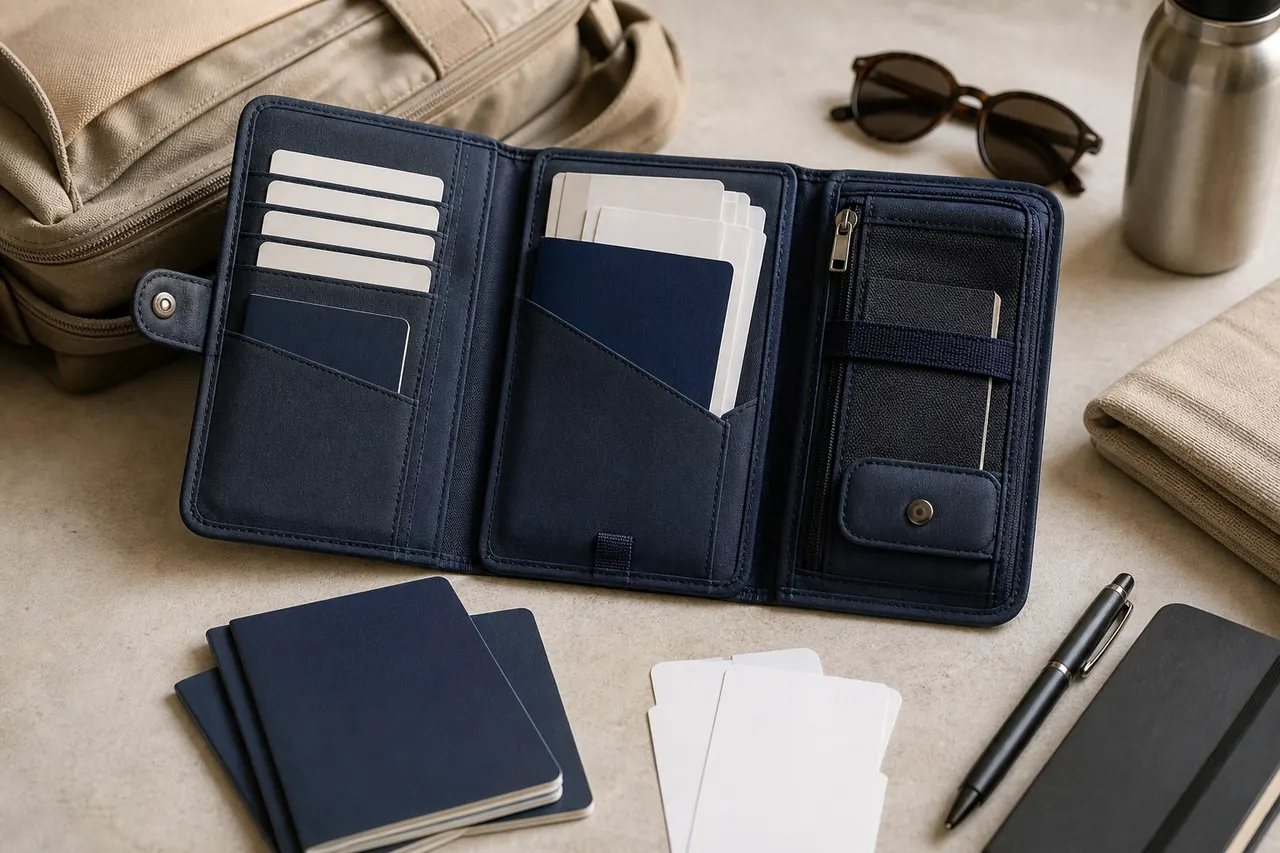
First list the documents you must carry during the trip
First determine what you will actually carry, then look at the wallet's appearance. Do not count all items you "might use later," as this can lead to buying a wallet that is too thick and difficult to manage.
It is recommended to list items in the following four categories:
Core documents: passport, ID card, residence permit, or other travel documents.
Frequently used cards: cards needed for boarding passes, transit cards, primary payment cards, and hotel room keys.
Temporary papers: boarding passes, itineraries, insurance certificates, visa materials, or customs documents.
Backup items: a small amount of cash, backup cards, SIM card ejector tool, or emergency contact card.
Record the quantity of items in each category and note the frequency of access. Passports and backup cards usually require more reliable closure protection; boarding passes and transit cards need quick access. If multiple people share one travel wallet, calculate based on the actual number of passports, rather than assuming a "family style" label applies.
This guide does not apply to scenarios requiring tablets, large amounts of coins, thick keychains, or full folders. In that case, consider a travel organizer or small carry-on bag instead.
What the vigorbuy Spreadsheet can help filter and what it cannot prove
The records on vigorbuy-spreadsheets.net help you centrally compare candidate links, titles, visible compartments in images, and seller-listed specifications. Its value lies in organizing information and narrowing down options, not replacing verification on the original product page. 🔍
The spreadsheet can help you:
Filter candidates by passport slots, card slots, document layers, and cash layers.
Compare closure methods such as zippers, snaps, and open pockets.
Record seller-listed dimensions, colors, specifications, and packaging options.
Flag products lacking side views, interior views, or closure detail images.
Save verification dates to avoid treating old prices or stock as current information.
The spreadsheet itself cannot prove:
That the product is currently in stock and the link is still valid.
That the images exactly match the actual shipped version.
That material, water resistance, durability, or RFID-blocking features are genuine.
That a passport will definitely fit or that zippers will not jam over time.
That brand, authorization, returns, or import conditions in the destination country are without risk.
When encountering descriptions like "genuine leather," "waterproof," "anti-theft," or "RFID-blocking," record them as seller claims, not verified performance. Without material descriptions, structural photos, or other verifiable evidence, do not base purchase decisions on them.
Determine capacity based on the number of passports, cards, documents, and cash
Capacity assessment should start with the quantity and thickness of items. A single person's short trip usually needs only one passport slot, a few card slots, and a document area; for multiple people, pay special attention to whether stacked passports will squeeze the closure.
You can estimate in the following order:
Stack the passports, cards, and folded documents you plan to carry.
Measure the longest side, widest side, and total thickness of the stack.
Compare with the internal dimensions listed on the product page, not just external dimensions.
If only external dimensions are given, mark "internal capacity to be confirmed."
Allow space for zipper tracks, seams, and edge binding; do not buy based on exact equal dimensions.
Do not judge card slots by advertised numbers alone. Stuffing two cards into one slot may cause deformation or difficulty in removal; coins and large amounts of banknotes will significantly increase thickness. If documents must be folded repeatedly, they may not be suitable for transit or transfer trips requiring quick presentation of materials.
Compare access differences among zipper, snap, and open structures
A full zipper closure generally better restricts accidental sliding out of passports, cash, and receipts, but requires more steps to open and may strain the zipper if overstuffed. It suits travelers who prioritize security against dropping over quick access.
A snap closure opens more quickly and provides basic closure protection, but you must check whether the snap position directly presses on passport edges or cards. When the wallet becomes thick, the snap may not close properly, so especially with multiple users, verify capacity.
An open structure is most convenient for accessing boarding passes and transit cards, but is not suitable for protecting all documents on its own. It is better used as a compartment organizer inside a carry-on bag, not as a primary document protection layer exposed to the outside.
If a candidate has a lanyard, also determine whether the lanyard attachment point is at an independently reinforced location. A front view alone cannot prove the attachment is sturdy. A lanyard reduces the chance of dropping when held, but may also get caught on door handles, seats, or luggage, and cannot replace a zipper or snap.
Check image evidence of compartments, closures, and lanyard positions
When viewing candidate images, record "seen" and "inferred" separately. 📷
Prioritize the following shots:
Interior front view with wallet fully opened.
Edge clearance after placing passport in compartment.
Zipper start point, end point, and corner positions.
Thickness change before and after snap closure.
Card slot opening direction and its distance from wallet edges.
Lanyard attachment point, stitching or riveting details.
Bulging degree in side view with items loaded.
If images only show an empty wallet, do not judge closure effect when full. If passports and cards in images are just props for display, do not deduce actual dimensions. When no scale, dimension drawing, or specific specs are available, mark capacity conclusions as to be confirmed.
Also note whether different colors or specifications use the same set of display images. If title, specification selection, and image structure are inconsistent, confirm the actual shipped version with the seller first and keep the response record.
Use a candidate comparison table to record dimensions, compartments, and pending confirmations
It is recommended to keep only three to five candidates that meet basic capacity conditions, then verify each item. Each data point in the table should note whether it comes from product page listing, image observation, or seller response.
Verification item | Candidate A | Candidate B | Candidate C |
|---|---|---|---|
Original product link and verification date | To be filled | To be filled | To be filled |
External dimensions and internal dimensions | To be verified | To be verified | To be verified |
Number of passports that can be placed separately | To be verified | To be verified | To be verified |
Card slots, document layers, and cash layers | To be verified | To be verified | To be verified |
Closure method | To be verified | To be verified | To be verified |
Lanyard attachment evidence | To be verified | To be verified | To be verified |
Material or functional claims | To be verified | To be verified | To be verified |
Specifications, packaging, and return boundaries | To be verified | To be verified | To be verified |
Do not use "best," "premium," or "safer" as comparison fields. Instead, use observable, verifiable descriptions such as "has full zipper closure," "card slots open inward," or "internal dimensions not listed." This makes it easier to spot information gaps and avoid being influenced by adjectives in product titles.
Check links, specifications, packaging, and return boundaries before ordering
After navigating from the table to the original product page, first confirm that the link opens normally, the page has a clear product name, visible specifications, and images sufficient to identify structure. Redirect pages, blank pages, dead links, or pages with only category labels cannot serve as a valid basis for purchase.
Complete at least the following checks before ordering:
Verify that the selected color corresponds to the same internal structure.
Check packaging differences such as single piece, multi-piece set, or accessories only.
Confirm units of measurement and distinguish external dimensions from usable internal space.
Check current displays of stock, price, domestic shipping, and other fees.
Confirm whether returns are supported and whether restrictions apply to custom, sale, or opened items.
Save screenshots of the product page, specification selection, and seller confirmation messages.
Do not expose passport numbers, order numbers, addresses, phone numbers, or payment information in public messages or screenshots.
Price, stock, shipping, seller policies, and link status can change, so re-verify on the payment date. Cross-border shipping may also incur warehouse handling fees, international shipping, destination country taxes, and customs requirements; the product price of a travel wallet does not represent the final landed cost.
Select candidates and save final verification records
When making the final choice, first eliminate candidates with insufficient capacity evidence, inconsistent structure and specifications, or unverifiable closure details. Then rank the remaining items by your own priorities: anti-drop structure, access speed, bulk, organization, and total cost. ✅
It is recommended to save a final record that includes:
Original product link and product title.
Selected color, size, style, and package quantity.
Verification date and currency displayed on the page.
Planned load quantities of passports, cards, documents, and cash.
Dimension drawings or seller responses supporting capacity judgment.
Image evidence of closure, compartments, and lanyard attachment points.
Unverified material or functional claims.
Return conditions, warehouse inspection priorities, and order screenshots.
During warehouse inspection, focus on checking the received color and specifications, whether zipper or snap is intact, whether compartment count matches, and whether lanyard and connectors are missing. Images cannot prove long-term durability or all functional claims, but can help you spot obvious wrong models, missing parts, or structural mismatches within the return window.
This filtering method usually does not directly lower the product's listed price, but it reduces the chances of buying the wrong capacity, structure, or duplicate orders. The added cost is verification time, and it cannot eliminate risks such as seller description errors, shipping damage, limited returns, or destination country taxes. It suits travelers who have a clear document list, are willing to keep verification records, and prioritize anti-drop structure; if product pages lack dimensions, interior photos, and clear return conditions, or if you need to carry large amounts of documents and valuables, it is not advisable to order solely based on Spreadsheet records.
Frequently asked questions about shopping on agent platforms
1. Is it safe to use spreadsheets on vigorbuy-spreadsheets.net?
vigorbuy-spreadsheets.net does not collect any personal information; it is just a product catalog of an agent platform. All transactions are completed on the agent platform.
2. What should first-time users note when using the agent platform on vigorbuy-spreadsheets.net?
New users who access the Taobao agent for the first time through the spreadsheets on vigorbuy-spreadsheets.net usually receive a new-user shipping discount package. You should also review the step-by-step beginner's shopping guide.
3. What product categories are available on vigorbuy-spreadsheets.net?
vigorbuy-spreadsheets.net offers a wide range of product categories, including shoes, T-shirts, sweaters, hoodies, jeans, sweatpants, shorts, board shorts, factory clearance items, down jackets, baseball shirts, shirts, hats, jewelry, bags, electronics, sunglasses, socks, underwear, and trendy collectibles.
4. What products can I find in the spreadsheets on vigorbuy-spreadsheets.net?
The spreadsheets on vigorbuy-spreadsheets.net contain shoes, clothing, bags, accessories, jerseys, perfumes, hats, scarves, belts, and various household and lifestyle items.
Browse our latest products and find your next favorite item.